
Ten years ago, that would’ve sounded like science fiction. Today, it’s reality. AI image generators can transform plain words into vivid, photorealistic visuals, no camera, canvas, or Photoshop required.
It’s 2025, and these tools have evolved way beyond novelty.
Even the simplest text prompt can create crisp, realistic, and jaw-dropping visuals. Remember when early AI images looked blurry or a bit “off”? Those days are long gone.
Today’s AI doesn’t just guess what you mean, it carefully translates your words into art. The secret? Writing the right AI image generator prompt.
In this guide, whether you’re just starting out or already creating like a pro, you’ll discover:
>> How to craft prompts that grab attention
>> Advanced tricks like negative prompting and composition commands
>> Real examples you can use right away
>> The latest AI art trends shaping 2025
Understanding the Fundamentals of AI Image Generator Prompt (Beginner-Friendly)
A. Defining an AI Image Generator Prompt:
In essence, an AI image generator prompt serves as a textual directive, either a single instruction or a collection of them, provided to an AI model designed for image creation. This written input communicates the desired visual outcome to the AI.
Think of it like giving directions to an artist. Instead of handing them brushes, paints, and a canvas, you’re handing the AI your text. It then uses algorithms and massive collections of visual data to turn those words into the picture you imagined.
B. Primary Components of a Basic AI Image Generator Prompt
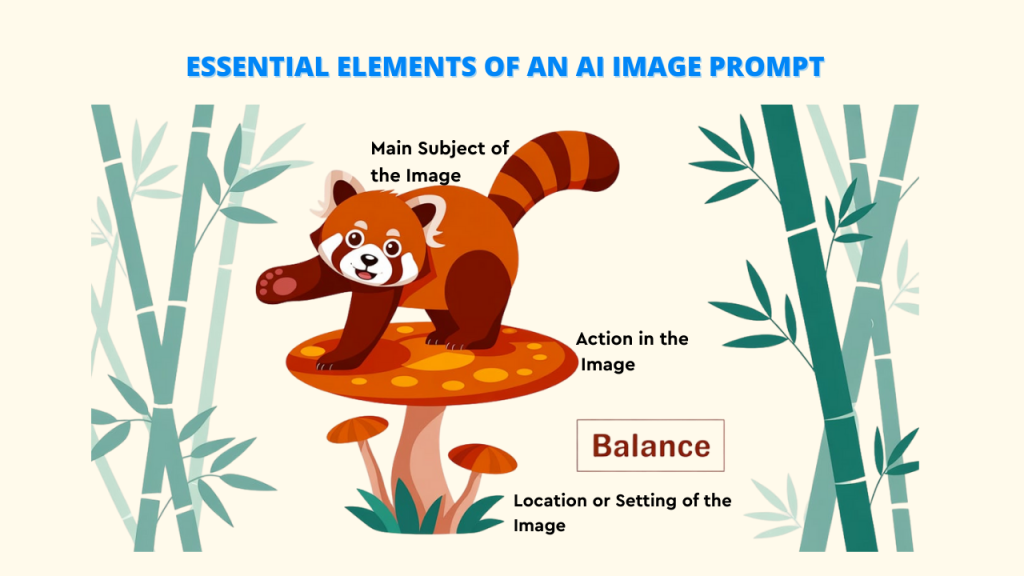
Even the most straightforward prompts typically encompass these core components:
1. Main Subject of the Image:
This is the most important thing to show in the picture. It ought to be an adorable animal, a scene, an emotion, or something else entirely. As an example:
▶️ A village from old times
▶️A 25-year-old boy
▶️ A puppy
2. What is Happening or Action in the Image:
This describes what the subject is doing. It adds more detail and life to the image. You don’t always need it, but it helps make the picture clearer. For instance :
▶️A magical village from ancient times
▶️A 25-year-old boy sitting near a river
▶️A puppy cuddling inside a small house on the lawn
3. Location or Setting of the Image:
This explains where the subject is and what the surroundings look like. For instance:
▶️A magical old village with colorful flower trees.
▶️A 25-year-old boy sitting by the river, tossing small stones.
▶️A puppy inside a tiny house on the grass, holding a red ball
Quick AI Image Generator Prompts and What They Produce
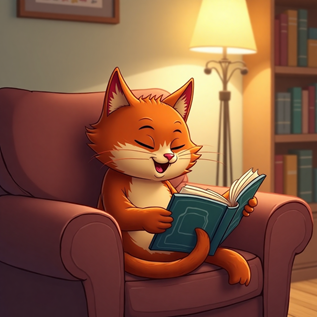
Basic Prompt 1: “A red-headed cartoon cat giggling while reading a comic book on a sofa in a cozy room .”
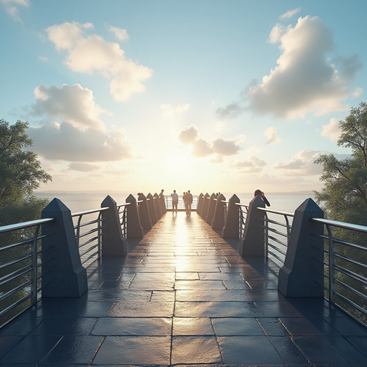
Basic Prompt 3: “create a view of a footbridge with great sky view and people are getting images clicked”
Why AI Image Generator Prompts Need to Be Clear and Specific
When you’re starting to use an AI image generator to create pictures, using simple and clear prompts can really help. For example, don’t just say “a flower.” Instead, try saying something like “a close-up of a red rose with water drops on the petals.”
The clearer your prompt description is, the better the AI image generator understands what you want. This helps the AI image generator make a picture that looks just like you imagined. Being specific is useful even with beginner-friendly tools like Pixci, which make image creation easy without needing complicated prompts, especially when you’re working on more detailed or tricky images.
Why Writing Good AI Image Generator Prompts Matters (Especially in 2025)
Evolving AI Image Generator Prompt Capabilities
AI image generator models that create images from text are getting better and more powerful.
These new AI image generator tools don’t just read prompt words; they also understand more complex details, notice how things relate to each other in a scene, and can even use different kinds of input. But writing clear text is still the main way to control what kind of image the AI makes.
If you want great images that match your ideas, you need to write better, more detailed prompts to guide the AI in the right direction.
Impact of AI Image Generator Prompt Quality
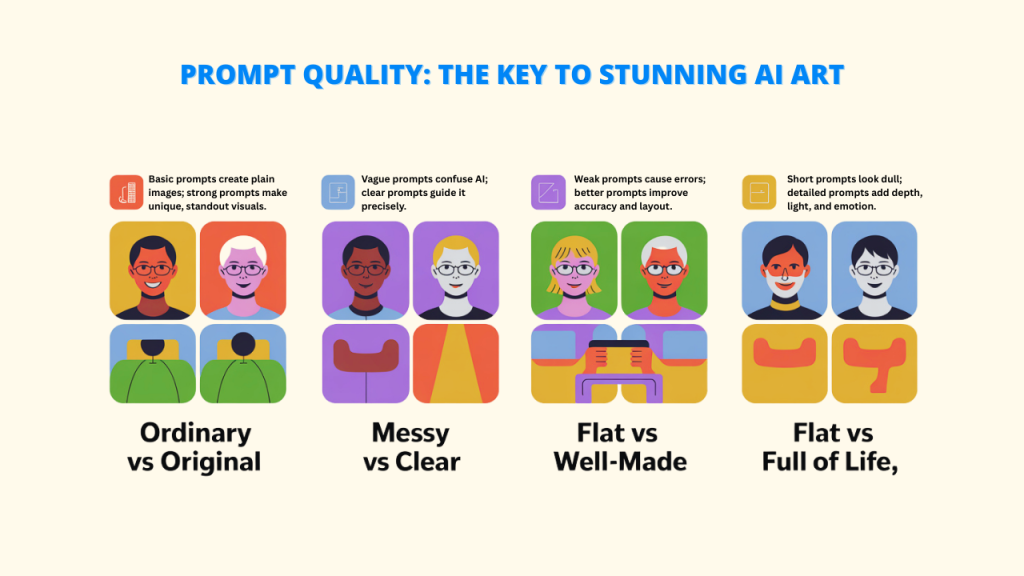
Frequently, the distinction between an ordinary AI image generator prompt and an outstanding one is the following:
➕Ordinary vs. Original: Basic prompts give you common or plain images. But well-written prompts can help create pictures that stand out and feel special.
➕Unclear vs. Clear: If your AI image generator prompt is too vague, the AI might guess wrong. A clear and detailed prompt tells the AI exactly what to make.
➕Messy vs. Well-Made: Simple prompts often lead to mistakes with body shapes, angles, or how things are placed. Better prompts can fix these problems. Tools like Pixci also help by offering ready-made workflows you can search and use easily.
➕Flat vs. Full of Life: Short prompts may look dull, while better ones add depth, light, and emotion to the image.
Examples: Good vs. Bad Prompt Results
Bad Prompt: a flower
Likely Output: A generic image of a flower. It could be any type, color, or style.
Good Prompt: a close-up photorealistic image of a vibrant crimson rose with delicate water droplets on its petals, soft golden hour lighting, shallow depth of field
Likely Output: A detailed and visually appealing image of a specific type of flower with desired lighting and photographic qualities.
As AI image generator tools become a bigger part of creative work, knowing how to write clear and creative prompts will be a must-have skill. Whether you’re an artist, designer, marketer, or just doing it for fun, good prompts will help you get the results you actually want.
Basic Prompting Techniques for AI Image Generator Prompts (For Beginners)
A. Crafting Effective AI Image Generator Prompts
If you want the AI image generator prompt to make the image you’re imagining, it’s helpful to follow a simple and clear structure:
Subject + Style + Type + Extra Details
> Style: The look or feel (realistic, cartoon, abstract, etc.)
> Extra Details: Things like lighting, background, mood, or colors.
> Type: How the image is made (photo, painting, digital art, etc.)
Formula in Action for Prompts
Here are a few simple examples that demonstrate this approach for:
- “A young traveler [subject] in a cyberpunk theme [style], made as digital art [type], with neon lights, a city in the background, and rain [extra details].”
5 Example AI Image Generator Prompts that Work Consistently Well (for Beginners):
1. A boy holding ice cream and looking at the sky with smile, in pixel style
2. A vibrant city with blue buildings and people walking through roads
3. A shining caramel over cheesecake with a pineapple piece on it , a closeup shot
4. A cat playing with fish made of wool sitting on woman’s lap in a cozy room
5. A train moving through a tunnel and on the other end we can flush greenery, scenic view , 3D.
B. Understanding Style Parameters for the AI Image Generator Prompt
Selecting the right style settings can significantly impact the appearance of your AI-generated images. These include art style, period, lighting, and technical options.
Common Art Styles You Can Use:
🔺Pixel Art – Old-school style with blocky pixels
🔺3D Render – Realistic or cartoon-like 3D models
🔺Photorealistic – Looks like a real photo
🔺Graphic Novel Book – storytelling cartoon, creative style
🔺Digital Art – Smooth, clean computer artwork
🔺Oil Painting – Classic style with thick brushstrokes
🔺Anime/Manga – Japanese-style drawing
🔺Watercolor – Soft colors with paper texture
Time Periods and Artistic Movements:
You can choose styles based on different periods or art themes, such as Art Deco, Impressionism, Surrealism, Renaissance, Baroque, Victorian, Cyberpunk, or Steampunk.
These styles are great for making marketing images, social media posts, or creative projects—especially when using tools like Pixci that offer helpful options for different needs.
Lighting and Mood Settings:
Different lighting can help you create the mood of your picture, such as:
- Soft lighting
- Golden hour (sunset/sunrise look)
- Backlit or rim lighting
- Moody, dreamy, bright, dark, or mysterious
C. Using Reference Artists and Works:
Mentioning well-known artists or famous artworks can help make your AI images more creative, but in 2025, it’s important to do it the right way.
Ethical Referencing Guidelines:
- Say things like “inspired by the style of” instead of making it seem like the image was made by that artist
- Focus more on the artist’s technique (like lighting or layout), not the artist themselves
- Remember: some AI tools block prompts that copy styles of living artists without permission
When to Use Specific Artwork References:
If you’re thinking of a well-known painting, you can refer to it directly. Example: “A portrait like Da Vinci’s Mona Lisa.” But keep in mind—AI might change things or add its own twist.
Legal and Platform Considerations (2025)
As AI art evolves, so do the legal considerations surrounding copyright and intellectual property.
- Many AI tools protect artists’ rights and block certain AI image generator prompts
- Some artists now allow their styles to be used, especially on platforms like Pixci that offer tools for more open creativity
- If you’re planning to sell or use the image for business, you may need a license—always check the platform’s rules
Intermediate Prompting Strategies for AI Image Generator Prompts
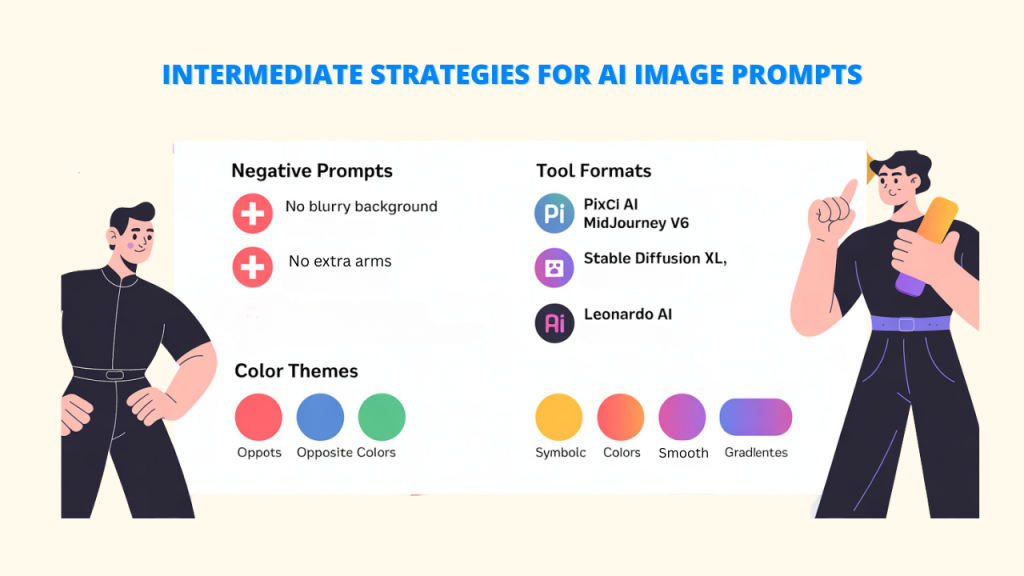
A. Mastering Negative AI Image Generator Prompts (What You Don’t Want)
To prevent errors and create better images, NEGATIVE PROMPTS are very helpful. What they can do to assist:
- Tell the AI to avoid things like: “no blurry background,” “no extra arms or legs.”
- Fix problems like wrong body parts or strange shapes in the image
B. How Different Tools Handle Negative Prompts in 2025:
Each AI image platform prompt uses its own way to write negative prompts:
- Pixci AI: Write “Exclude:” and then list the things you don’t want
- MidJourney V6: Use –no before the words you want to avoid
- Stable Diffusion XL: Add the unwanted things in a separate box or use [negative: ] format
- Leonardo AI: Lets you adjust how strongly you want to block certain elements using special fields
C. Making Images Look More Connected (Color Themes)
The image’s focus and balance can be improved by using color:
➕Opposite-but-matching colors: “A person with a blue background and orange-pink highlights”
➕Symbolic colors: “A political scene with just red and blue.”
➕Smooth color change: “A scene that fades from warm colors in the front to cool ones in the back.”
Advanced Prompting Techniques for AI Image Generator Prompts (For Experts)
A. Prompt Engineering and Chain Prompting
To better control complex images, break your idea into smaller parts or tell it like a story.
Describe each part of the scene—what’s in front, in the middle, and in the back.
✅ Example: “A space station with crystal towers (back), vendors and people walking (front), all lit by three moons.”
Alternatively, write it as if it were a plot point. ✅ Example: “An explorer finds ancient ruins; a flashlight shows old symbols, dust in the light, and jungle sounds behind.”
You can also use photography terms to explain what you want clearly.
B. Making Characters Look the Same Every Time
To guarantee that your characters show up consistently across all of your images:
- Show them from different sides (character sheet)
- Use the same seed value and repeat traits
- Highlight special things about them (like silver hair or special clothes)
- Keep the same art style
- Place them in different situations, but keep their look the same
Example:
“Full-body character sheet of a female elven ranger, silver hair, green eyes, leaf-patterned leather armor, fantasy illustration style, shown from multiple angles.”
Showing Products in AI-Generated Images
If you’re creating product images for work, write your prompts for the right use case:
For ads or websites:
✅ “Simple smartwatch on white marble, clean background, soft studio lights.”
For lifestyle scenes:
✅ “a women sitting on chair near the door of a vintage house with beautiful interior”
All of this is possible with cutting-edge artificial intelligence software, such as Pixci, which allows you to create promotional materials, product AI-generated images, and social media content on a budget.
C. Using New AI Image Generator Prompts Features in 2025
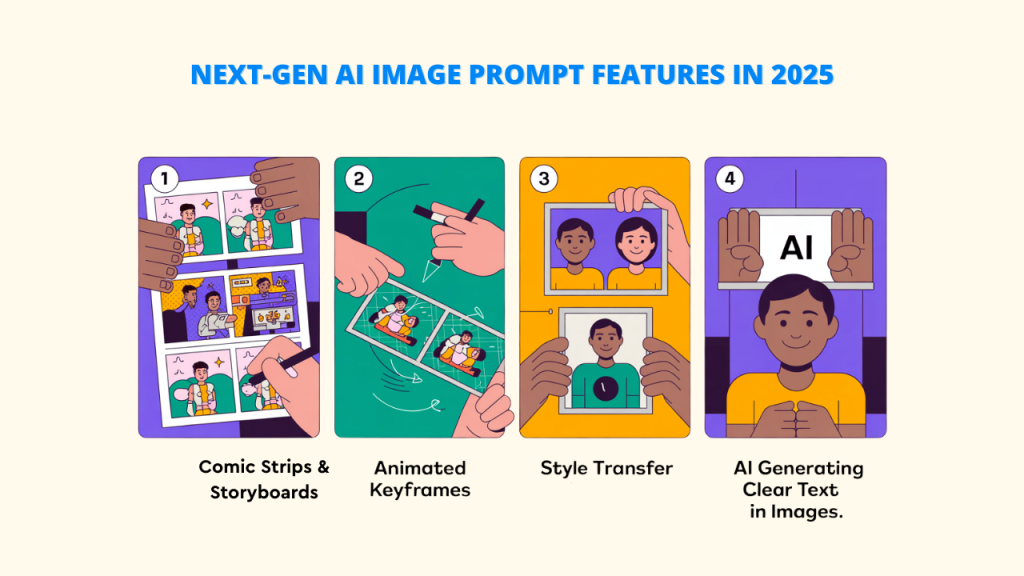
AI tools for making images are changing fast. In 2025, we’ll see smarter features that advanced users can use by giving the right prompts.
1. Comic Strips and Storyboards with Multiple Images
Some tools now let users create a series of images for comics or storyboards. You can ask the AI to make different panels with characters doing actions, showing emotions, and being in different places. It can also keep the look of the characters the same in each panel.
2. Animation Keyframe Creation
Even though AI can’t fully make videos yet, it can help with animation by creating important frames (keyframes). You can describe how a scene starts and ends, and animators can fill in the rest.
3. Better Style Copying (Style Transfer)
AI is getting better at copying the style of one image and adding it to another. You can now give more detailed prompts, like how strong the style effect should be or which parts of the image should change the most.
4. Smarter Text and Fonts in Images
In the past, AI had trouble adding clear text to pictures. But in 2025, it’s improving. You can now tell the AI to use certain fonts, place text in a specific spot, and even make text look like part of the picture design.
Best AI Image Generator Prompt Examples for 2025
This list shows how you can write image prompts for AI tools, based on your skill level. The ideas stay the same, but use simpler words and a clearer structure.
🌱 Beginner Prompts – Easy and Clear
1. “A magical village of treehouses, connected with wooden bridges and glowing lanterns, built inside giant old trees, drawn in a fantasy art style.”
2. “Old books, a copper teapot, and autumn leaves arranged on a wooden table near a window, with soft daylight.”
3. “Peaceful mountain lake showing the reflection of snowy mountains at sunrise, light fog in the air, bright natural colors, wide view like a photo.”
🌿 Intermediate Prompts – More Detailed and Creative
4. “A mother and child sitting alone in waiting areas at a silent, empty airport at five o’clock. Reflections can be seen in the gleaming flow. creates a sense of loneliness reminiscent of anime.”
5. “A giant ancient library carved into the side of a cliff. Huge shelves full of books. Spiral stairs connect different floors. Scholars study at their desks. Light comes through high windows, with dust floating in the air. Fantasy-style detailed artwork showing amazing building design.”
🌳 Expert Prompts – Artistic and Complex
6. “A clear sky with a design view of a green, eco-friendly village built on a hill. The buildings are made from natural things like wood and stone. The scene shows a wide view during evening daylight, using a balanced layout (rule of thirds).
Conclusion
In 2025, the real superpower in AI image generation isn’t just having the right tool—it’s knowing how to talk to it. A clear, creative prompt is like giving AI a precise map to your imagination, guiding it to create visuals that truly match your vision.
You’ve covered the fundamentals, discovered expert advice, and seen real-world examples that you can use immediately. The truth is that when you start experimenting, the magic happens. Tweak your wording, try bold ideas, and see how small changes can transform the results.
Try Pixci. Using the numerous pre-built AI models and readily available tools, you can do away with guesswork. From quick product shots to intricate artwork, Pixci enables anyone, from novices to pros, to quickly create beautiful images.
So go ahead—play, explore, and push your creativity. The world of AI art is evolving fast, and the best way to stay ahead is to keep creating. After all, the future of visual storytelling is already in your hands.
FAQs about AI Image Generator Prompts
For optimal effects, how long should my prompts be?
How can I keep my AI image generators consistent?
– Use the Same Prompt Format: If the format that works best is supported by your AI tool, stick with it.
– Describe Clearly : Use the same clear details for characters, backgrounds, and scenes.
– Stick to One Style: Choose one art style and use it every time.
Is it okay for me to sell or use photos created by an AI image generator?
Which AI image generator should I choose?
🔺Pixci AI – Best for making characters. It also gives access to many AI models, which makes things easier.
🔺MidJourney V6 – Great for creating creative and artistic pictures.
🔺 DALL·E 4 – Easy to use and good for quick image creation.